
- Tech Note: Using CoreData in a SPM executable
-
In one short link post John Gruber indirectly makes an excellent case for breaking up tech giants:
Really good quarter for Nintendo — converting yen to USD, about $4 billion in revenue, $1.4 billion in profit. That’s great for them, but peanuts by U.S. tech giant standards. Fascinating how outsized Nintendo’s influence is on both the gaming industry and pop culture at large compared to their financial size.
Yuo can flip the last sentence the other way around: Isn’t Nintendo’s success, influence and financial success a great indicator that this is an excellent size for a tech company? What similar heart-warming tech companies didn’t make it this far because they got crushed by the giants?
-
The essence of an app
Horace Dediu has a way of putting things into an insightful perspective that makes you look at things differently. In the latest Critical Path episode, he points out that what people enjoyed about the iPod (and the Walkman before) wasn’t just that it let’s you take your music with you, but that it gives you privacy in a public space. Similarly, the product of a gym is not just exercise, but delivering a feeling of guilt. It’s a way of looking at a thing beyond it’s features and immediate use case.
Look at the current success of Widgetsmith. Apple touted widgets as a way to get glanceable information on your home screen, but that’s not why they took off - they took off because to many people their phone’s home screen is their virtual home and letting them decorate it their way means something to them.
On a much smaller scale, when I released my album-focussed music player Longplay, I received a good amount of feedback and praise. Interestingly, a theme emerged after a while from people expressing that they love the app not because of any specific features but because it let’s them reconnect with their album library in a way that reminded them of their old vinyl or CD collections. It’s a wall of their favourite albums that has been with them for many years or decades. It’s something personal.
While I developed and used the app myself, I had a vague sense of that, but soaking in that feedback from users and getting those different perspectives, revealed the the “heart” or the “essence” of the app. That in turn helps digest and prioritise other feedback, suggestions and wishes. When you have an understanding of what that essence of your app is, it becomes much clearer what to say “no” and what to say “hell yeah” to.
What I’m taking away from this is that it’s important to look beyond the features, and try to get a feeling of what’s underneath and what’s the defining principle. It’s hard to find that yourself and you might need quite a bit of user feedback to get to that. But if you find it, it can be inherently rewarding, and might reveal aspects of directions to take your app that you did not consider before.
-
Introducing Longplay
Longplay, my first self-published iOS app, is now available on the App Store. I’m super excited.
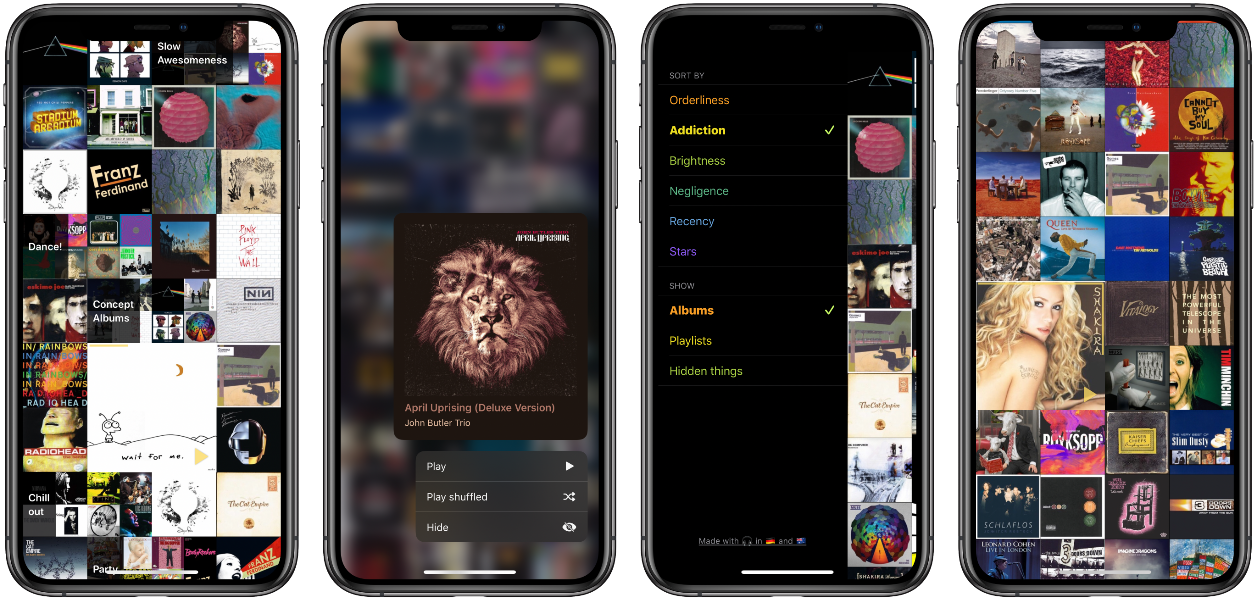
What it is
Longplay is a music player for anyone who enjoy listening to entire albums start-to-finish. It digs through your Apple Music or iTunes library 1 – that might have grown over the years or decades and is full of a mix of individual songs, partial albums, complete albums and playlists – to identify just those complete albums and gives you quick access to play them.
It provides a beautiful view of all your album artwork, and let’s you explore your albums (or playlists) by various sort options. A unique one is Negligence which combines how highly you’ve ranked an album and when you last listened it, to let you rediscover forgotten favourites. Brightness sorts the albums by their primary colour for an interesting visual take on your albums collection.
You can hide albums or playlists that you don’t want to show up - useful for meditation or kids albums, or smart playlists that you use for doing house keeping.
For users who want to listen on specific AirPlay devices, such as multi-room audio systems or headphones, there’s a “Play on” feature that’s the quickest way to listen on the right device.
It’s fully VoiceOver accessible, too. It works well on iPhone and iPad – including splitscreen support and a delightful cursor effect.
If that sounds intriguing to you, head over to the App Store. It’s USD 2.99, EUR 3.49, AUD 4.49, or equivalent in your currency.
Quick access to AirPlay & headphone selection
Pointer effects on iPadThe long road to Longplay
I started building the app under the name Albums back in mid 2015 for iOS 8.3 to experiment with the nascent Swift programming language and to scratch my own itch of being frustrated with finding my complete albums in the iOS Music app. I had a smart playlist for it in iTunes on my Mac, but that didn’t translate to iOS. A short while later I came up with the name Longplay to give it some more character and made a first attempt to get the app onto the App Store. However, due to the screenshots all using artworks of my music album, that was a no-go and I didn’t pursue that avenue further, though I did keep using the app myself since then.
In 2016 I started using Spotify and added the capability to Longplay to work both with an iTunes music library. While I got that working, I also encounteered a bunch of headaches with the closed-source Spotify SDK. Those meant I kept using the app just byself and had a couple of friends using it, but a public release would have meant addressing all those Spotify edge cases - not great for a side project.
End of 2017 I did a minor update to Longplay to accommodate the latest Swift language features such as Codable.
2018 and 2019 went by with me using the app using a lot but no code changes. During that time I started using a Sonos system at home and listening to my music on that. When AirPlay 2 came out and Sonos supported it but Spotify didn’t, I switched away again from Spotify to Apple Music.
Early 2020 I decided that now that I’m not using Spotify myself anymore, I could release Longplay without the (headaches of the) Spotify integration. So I spent quite some time modernising the code base, squashing bugs, polishing and the app, and prepared for the public release.
Getting the app itself ready for release was quite some work2. And then there was the challenge of getting it approved for an App Store release which went through several rejections and took one-and-a-half months. Alas, here we are! I’m really thankful for all the support, testing and feedback from my family and friends during development, the friendly folks over at the CoreInt Slack for emotional support and helping me collect the necessary fake and openly licensed artwork, and all my beta testers for their feedback.
Developing Longplay is a blast – working on a music player is something special for me. I love listening to music. It always lifts my mood – in particular when I’m not aware that I needed to have my mood lifted. And whenever I work on Longplay I just have to listen to all my favourite music.
What is next
I’m curious how the app will be received, and I very much I look forward to keep supporting the app now that it’s out in the wild!
A 1.0.1 update is imminent which aligns the play/pause button logic to mimick the Music app, and also adds to the contextual preview some information on the sorting: “Addiction” will show you how many times you’ve listened to an album, “Recency” will show when you added it to your library, and “Stars” will show your average rating for the songs on that album.
For the upcoming iOS 14 release, I’m exploring a home screen widget to show the top albums/playlists by a sort order of your choice.
Update: All these and more have been added and released in the mean-time, see here.
There’s some more info on the app on its dedicated page and in the Press Kit. Any questions, ping me on micro.blog,
by tweetor by mail. And, of course, I’d be thrilled if you get the app and I hope you’ll enjoy it.-
No, Spotify is not supported. Read on for more. ↩
-
A few notable things from going through the git log: I switched from CocoaPods to Swift Package Manager and use diffable data sources, removed Spotify, made the settings discoverable and added VoiceOver support for accessing them, added contextual actions including quick access to AirPlay controls, added haptics, fixed a whole tons of smaller bugs and performance issues, indicate status of calculating the per-album brightness information, and added the little thank you screen. ↩
-
- Tech Note: Vapor: Loading resources
- Tech Note: Vapor: Simple automatic deployment using Docker and GitLab CI
- Tech Note: Using Carthage in a Catalyst app
- Tech Note: iOS 13 toe-dipping: Multi-window support on iPad
-
Framework Sherlocking at WWDC 2019
WWDC is lovingly referred to as “Christmas for Apple Developers” and, goodness, was it a Bescherung this year! Apple has been hitting it out of the park at this year’s WWDC. While in the past many developers have been worried that their apps were getting replaced with Apple’s own new or improved apps (aka “Sherlocking”), a big surprise of this year is how many third-party libraries and tools now have first-party replacements1:
- Declarative views: CvlView → SwiftUI
- Building forms: Eureka → SwiftUI.Form, via @kuba_suder
- Reactive programming: RxSwift or ReactiveCocoa → Combine
- Reactive table/collection data sources: RxDataSources → diffable data sources
- Cryptography: CryptoSwift → CryptoKit
- Dependency management: Carthage → Swift Package Manager right in Xcode
- Icons with custom weights: PaintCode → SF Symbols
Granted, none of these are complete replacements2, and developers cannot rely on all those first-party replacements yet either (as most of them require iOS 13), so these third-party frameworks and tools still have reason to exist.
I am very excited about this. It’s not changing what you can do, but how you can do it. As Brent Simmons puts it nicely, it is the start of a new era, which is significant as the previous era has been going for close to thirty years.
It is great that Apple is modernising the frameworks and giving declarative and reactive programming the first-party treatment, learning from what both the Apple developer community and other platforms are doing. Having Apple throw their support behind these concept will likely accelerate and improve them further, too. SwiftUI in particular has tremendous potential — not just for Apple platforms. Might I dare ask how much effort would it be to generate an Android app from a SwiftUI code base? Though, unlike Swift itself, SwiftUI and Combine are not open source (yet?).
Developing for Apple in the 2020-ies will look much different than it does now. Exciting times and a lot to learn!
-
These are only the ones that I’m familiar with and that stood out to me in the subset of videos that I watched. There’s likely even more. ↩
-
See for example this comparison of Combine vs. RxSwift. ↩
-
Next steps for Siri, and other WWDC 2019 wishes
Apple’s annual developer conference, WWDC, is just around the corner. As a developer of iOS apps and heavy user of macOS, this is always an exciting time of the year. There is talk about iOS apps being able to run on macOS and dark mode coming to iOS. Before I get busy with implementing these from next week on, it’s fun to take a step back and think about what I would like to see Apple do and let developers do. I’ll start with my hopes for Siri, and then more wishes from a more (power) user perspective and then from a developer perspective.
Make Siri a pro-active productivity assistant
Siri as a voice assistant is not overly exciting to me personally1. I use it mostly for simple things like setting timers and reminder, occasionally controlling my music, checking the weather, turning on my coffee machine and checking the battery of my car; but for most other things I turn to using my hands and having visual interfaces.
However Apple is making Siri slowly into more than a voice assistant; turning it more into a pro-active assistant that knows what you do when, and then gives you help by itself before you explicitly ask for it. This I find very exciting. So far Apple has only taken little initial steps down this path like predicting what app you’ll use next, or what location you’ll go to next and telling you traffic going there2. Exciting is what else Apple could do with this and what developers could do with it once Apple opened up these predictions.
From apps to actions
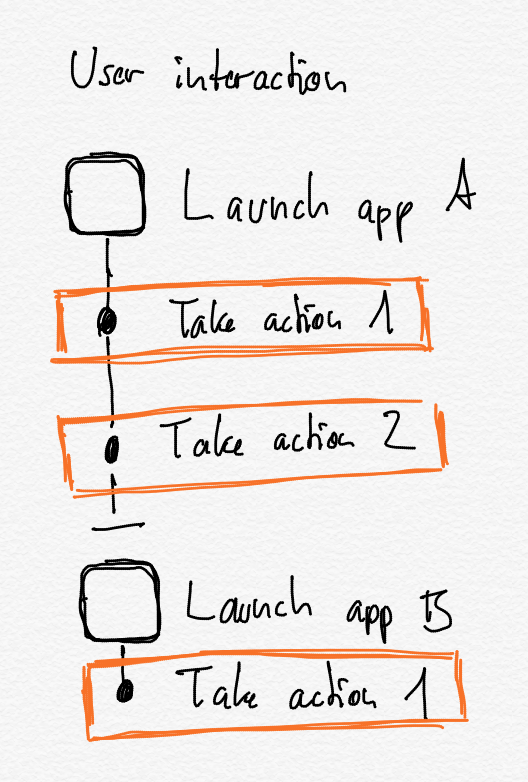
At WWDC 2018, Apple introduced Siri Shortcuts, which brought automation capabilities to iOS by letting developers expose what individual actions a user is doing in their app back to the operating system and also when the user’s are doing them. This enabled two things:
- Users can create short voice commands (so called Siri Shortcuts) for often used actions which then can run by themselves without launching the app, or open the app directly on the relevant section in the app.
- iOS can predict not just what app you’ll use next, but also what particular action you’re most likely to do next and suggest this.
The first of these was a great way forward for automation on iOS, especially in combination with the Shortcuts app that let’s users string together individual actions — just look at the iOS automation content on MacStories, the Automators podcast, and the many examples on Sharecuts. And I very much hope that Apple iterates this by allowing app developers to make those actions dynamic by letting users specify inputs and handle outputs coming from them.3
The second could be really interesting,4 when you consider that Apple could not just predict individual actions but also sequences of actions — including spanning multiple apps or even across devices5. In essence, Siri could learn repetitive actions that you do, and suggest entire multi-step Shortcuts for you to run, which you then can also customise further. This could be a great way to get people into Shortcuts and automation in general!
Let developers enrich the Siri assistant
My second wish related to a pro-active Siri is that Apple opens up the predictive smarts of Siri. It would be fantastic, if developers could, say, get access to predictions for your next destination (and departure or arrival time) or a contact you’re likely to interact with. Currently developers have to track you in the background or figure this out themselves by looking at your past usage of their apps.
Tapping into Siri’s predictions through an Apple-provided interface, would have several advantages:
- This could be done in a privacy-conscious way that keeps the user in charge, where the user could have controls over what is shared with what app.
- There could be a central way for users to redact predictions or past usage patterns, like you can currently do for locations in the Settings app under Privacy > Location Services > System Services > Significant Locations.
- Users would get more consistent experience across apps that use (or predict) this data, as well as across devices.
- Developers more easily integrate predictions into their apps.
I would love to work with these predictions and see what other developers would come up with.
Lastly, here’s an unordered grab bag of my other wishes:
User prespective
- Sharing of iCloud Drive folders not just individual files
- Shared Photo libraries for families
- Shortcuts for macOS
- Schedule a Shortcut to periodically run in the background
- Any improvements on iPad to multi tasking, window management, search and keyboard support would be appreciated
- A MacBook with a durable keyboard
Developer perspective
Developer tools on iOS:
- Xcode on iPad, so that I can only take my iPad to short trips and still be able to do some development work. I’m fine if it’s limited to a smaller feature set or Swift-only, as I don’t intend to write a full app on the iPad but would be great to work on some isolated features. Swift Playgrounds is a start but still a playground; I really want to have proper access to my projects and source code6.
- Terminal on the iPad, including being able to use homebrew.
SDK improvements:
- Share links for iCloud Documents, not just temporary snapshots but permanent and pointing to the same copy; just like iWork already gets it.7
- UI components for the card-based UIs that Apple is using in its Maps and Music apps.
- Using UIKit on the Mac and being able to mix it with AppKit
- That declarative UI framework
- Async/await in Swift
Fingers crossed, and here’s to exciting announcements. Happy WWDC to anyone attending!
Update from 13th June: The results are in
Siri + Shortcuts improvements:
- ✅ Allow app developers to create Shortcuts actions with dynamic inputs and outputs
- ✅ Shortcuts app to suggest Shortcuts based on how you use your device usage
- ❌ Provide an API to Siri’s predictions
- ❌ Shortcuts for macOS: Though Steve T-S is on it
- ✅ Schedule triggers for Shortcuts
User perspective:
- ✅ Sharing of iCloud Drive folders
- ❌ Shared Photo libraries
- ✅ Improved iPad multi-tasking and window management
- ❌ MacBook with a durable keyboard
Developers perspective:
- ❌ Xcode on iPad
- ❌ Terminal on iPad
- ❌ Public links for iCloud documents
- ❌ UI components for card-based UIs: No, the new sheet persentation style isn’t that
- ✅ UIKit on the Mac and mixing it with AppKit: Catalyst + AppKit
- ✅ Declarative UI framework: SwiftUI
- ❌ Async/await in Swift
Things I didn’t know I wanted:
- ✅ A first-party framework for reactive programming: Combine
-
It’s not helping that Siri is lagging behind Alexa and Google Assistant. ↩
-
Which isn’t particularly useful when you mostly get around by public transport, cycling or walking. ↩
-
As of iOS 12, the actions that third party apps provides are basically dead-ends. As a user, you cannot, say, get the cycling duration to work from Komoot, pass that duration to your favourite weather app, take the forecast, and then have the shortcut tell you whether to cycle or maybe better take public transport (or your rain gear). ↩
-
Though Apple so far hasn’t delivered much on this yet. In close to a year of iOS 12 usage (including betas) I have never seen any of these action suggestions on any iOS device. They do come up occasionally on the Siri watch face on my Apple Watch, but for me are mostly useless suggestions such as start timers of inappropriate durations or toggling HomeKit scenes that rarely match the one I want to trigger. ↩
-
Highlighting your inner procrastinator by predicting that since you’ve just closed twitter.com client on your Mac just a moment ago, now is a good time to open your favourite Twitter client on your iPhone. ↩
-
This makes me wonder if Xcode on iPad could being serious competition to Working Copy. ↩
-
Plus my list of radars related to sharing UIDocument from January this year. ↩